HTML Crash Course
HTML 101
Part 3. Comments & Nodes
Commenting Your Code
The very next thing we should learn about is HTML comments. Comments are not elements or tags, and they can appear almost anywhere in your code, even before the opening html tag or after the closing html tag. About the only places where comments cannot appear is inside other tags, but they can appear before or after other tags. Comments do not add content to the web page. They are completely invisible to any person who looks at the web page with a web browser. They are also transparent to the browser itself. They provide no information to the web browser. The main purpose for comments is strictly as information for the web developer or web designer. Comments are simply notes that explain what is happening with the code. They are designed for the benefit of anyone who looks at the source code now or later on down the road.
Comments begin with <!-- and they end with -->. Any text that appears between those two markers is the actual comment itself. The way we comment our code in HTML is unique to this language. CSS and JavaScript comments are formatted very differently that HTML comments. Below is an example of a comment in HTML.
<!-- This is a useful comment that explains something about other lines of code. -->
For instance and keeping in line with our previous discussions about the three most important structural elements in any web page and the six tags that define them, here is a well-commented HTML document that explains this essential framework.
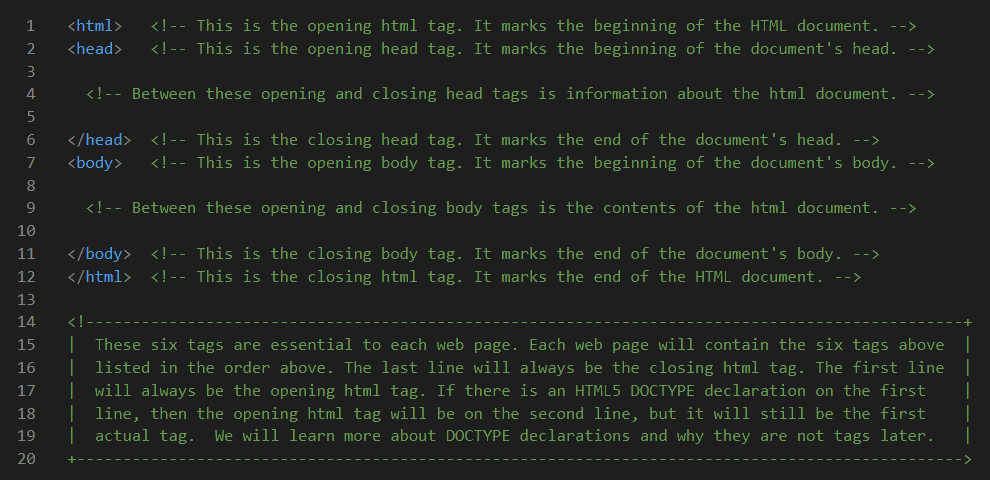
Of course, cutting and pasting this code into an HTML document and running it in a web browser produces a blank white web page with no content. This example is here only to illustrate the use of comments and to quickly review the six most essential tags.
Your Need to Node
There is a lot you need to know about HTML, but we are trying to take it slow so that it does not become too overwhelming. However, you truly need to know the definition and purpose of a node. In fact, all parts of an HTML document are nodes, including the entire document itself. That means that every element and every tag are considered to be nodes as well. We may specifically name them differently depending on their place in the HTML document. For instance, the Document Node is the root of the tree that represents the entire HTML document. The structure of the HTML document is determined by its tags, so they are called Element Nodes. Of course we have already learned that some elements, particularly those that have both opening and closing tags, can contains nodes of their own. So it should come as no surprise that the text inside of a paragraph or heading is called a Text Node. We just mentioned code comments which are similarly given the name of Comment Nodes. And eventually, you will learn more about Attribute Nodes which are attributes we assign to some tags. You will also learn that the HTML document has a hierarchy that is defined by the relationships between its nodes. This structural hierarchy is much like a family tree because it includes parents, children, and siblings as well.
Void Elements
Although we did not specifically call them void elements at the time we mentioned them, all tags that do not have both opening and closing tags are called void elements. A void elements has only a single tag and is not required to have a closing tag. Void elements are empty elements that cannot have other child nodes such as Text Nodes. They might however have attributes that are not considered to be children. For instance, a void element like <img src="house.jpg"> does have a src attribute that defines which image the <img> element will display, but that is not considered to be a child because it only helps to further define the element. And that's as deep down the rabbit hole as we need to go at this point.